How to Create Digital Stencils and Patterns for Projects
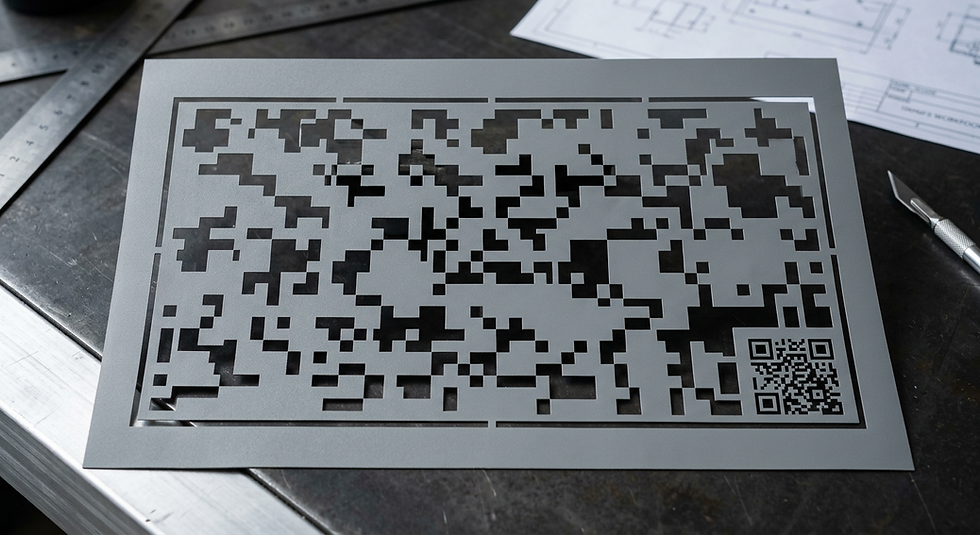
Creating professional-grade digital stencils and patterns requires a precise blend of vector design and technical preparation to ensure the resulting output, such as a digital camo SVG, translates perfectly to physical materials. Whether you are preparing custom camouflage designs for specialized coatings or adhesive masks, the process hinges on controlling geometric complexity and path alignment for laser cutters or vinyl plotters. When deploying these patterns as physical assets, you can even incorporate QR code functionality within the negative space of a stencil, allowing for scannable inventory tracking or branding embedded directly into your pattern.
Quick Summary
Digital stencils and patterns involve designing vector-based geometric files, like a digital camouflage stencil, that are optimized for cutting machines. Success relies on balancing complex pixelated shapes with structural integrity to ensure the stencil does not tear during application or painting processes.
Use vector software for scalable, clean lines.
Maintain stencil bridges to keep shapes connected.
Export files in SVG format for universal machine compatibility.
Always test material adhesion and cutting pressure.
Table of Contents
[Quick Summary](#quick-summary)
[Designing the Digital Camo Pattern](#designing-the-digital-camo-pattern)
[Optimizing Stencils for Machine Cutting](#optimizing-stencils-for-machine-cutting)
[Adding Functional Elements to Stencils](#adding-functional-elements-to-stencils)
[Troubleshooting Common Cutting Pitfalls](#troubleshooting-common-cutting-pitfalls)
[FAQ](#faq)
[Recommended Reads](#recommended-reads)

Designing the Digital Camo Pattern
Designing a digital camouflage pattern begins with establishing a modular grid. The characteristic look of digital camo relies on small, rectangular pixel blocks arranged in randomized clusters. To create this in vector software, start by defining a base pixel unit that matches the smallest dimension your cutting machine can reliably handle. If your blade or laser is not calibrated for extremely tiny squares, you will experience melting or tearing, which compromises the final result.
Once the grid is established, focus on negative space. A stencil is not just the pattern; it is the infrastructure holding that pattern together. When creating a digital camo stencil, you must ensure that each pixel is connected by a "bridge" of material. Without these bridges, the interior sections of your camo blocks will fall out during the weeding process. Aim for a bridge width of at least 1.5mm to maintain structural integrity across various substrates.
Optimizing Stencils for Machine Cutting
Converting your design into a cuttable digital camo SVG requires rigorous path simplification. Cutting machines often struggle with complex files containing thousands of unnecessary nodes. Use the "Simplify" or "Reduce Nodes" tool in your vector software to ensure that the computer processes the file efficiently without sacrificing the sharp corners required for the camo aesthetic.
Beyond node reduction, consider the order of operations. Always set your software to cut the internal pieces first, followed by the outer border. This prevents the machine from shifting the material once the interior tension has been released. If you are new to this workflow, exploring a comprehensive [how-to guide](https://kode.link/how-to-guide?lang=en_US) on vector pathing can save hours of failed attempts. Testing your file on a small scrap of masking vinyl before committing to expensive materials is standard industry practice.
Adding Functional Elements to Stencils
Modern stencil design allows for more than just aesthetics. By integrating utility into your digital camouflage stencil, you increase the value of your output. One highly effective method is incorporating QR code functionality into the stencil frame. By carving a scannable QR code into the border or a blank section of the stencil sheet, you can link the physical component back to [business resources](https://kode.link/business?lang=en_US) or specific instructional videos regarding the installation or painting process.
When scaling your patterns, ensure that the functional elements remain large enough to be legible by standard cameras. For high-stakes branding, linking your stencil to a [custom domain](https://kode.link/custom-domain?lang=en_US) provides a professional touch that sets your work apart. Always verify that your QR code has sufficient contrast; if the stencil is intended for black spray paint, ensure the code is cut in a way that allows for a high-contrast background color to show through.
Troubleshooting Common Pitfalls
One of the most frequent issues is the "weeding" phase, where the adhesive stencil becomes too delicate to handle. If you find that your digital camo blocks are lifting prematurely, ensure you are using a high-tack transfer tape. Applying a layer of low-heat transfer vinyl can also provide the necessary stability for intricate patterns during the application phase.
Another common failure occurs when the cutting blade is dull. Sharp corners in digital camo designs are the first to degrade if the blade drag is too high. If you notice rounded corners or frayed edges on your squares, perform a test cut on a new blade. For further technical support, you may find it helpful to review [release notes](https://kode.link/release-notes?lang=en_GB) from your cutting machine manufacturer to ensure your firmware is optimized for complex SVG parsing.
> Pro Tip: Always apply your stencil to a perfectly clean, degreased surface. Even a microscopic layer of dust can prevent the adhesive from creating a sharp seal, leading to paint bleed under the edges of your camo blocks.
FAQ
What is the best material for reusable camo stencils?
Polypropylene or Mylar sheets are ideal because they resist paint buildup and are durable enough for repeated use compared to standard vinyl.
How small can I make the camo pixels?
It depends on your cutting machine, but generally, stay above 3mm squares for reliable weeding and durability during the painting process.
Can I use QR codes on my stencils?
Yes, absolutely. By incorporating QR code functionality, you can link your stencil design to digital assets or [business cards](https://kode.link/business-cards?lang=en_US) for professional networking.
What file format should I use for laser cutters?
SVG is the industry standard as it provides clean vector paths that laser software can interpret without loss of quality.
Recommended Reads
[Understanding digital design basics](https://kode.link/what-is-kode-link?lang=en_US)
[Best practices for brand identity](https://kode.link/business?lang=en_US)
[Maximizing workflow with professional tools](https://kode.link/how-to-guide?lang=en_US)



Comments