A Comprehensive Guide to Canva QR Codes: Creation and Use
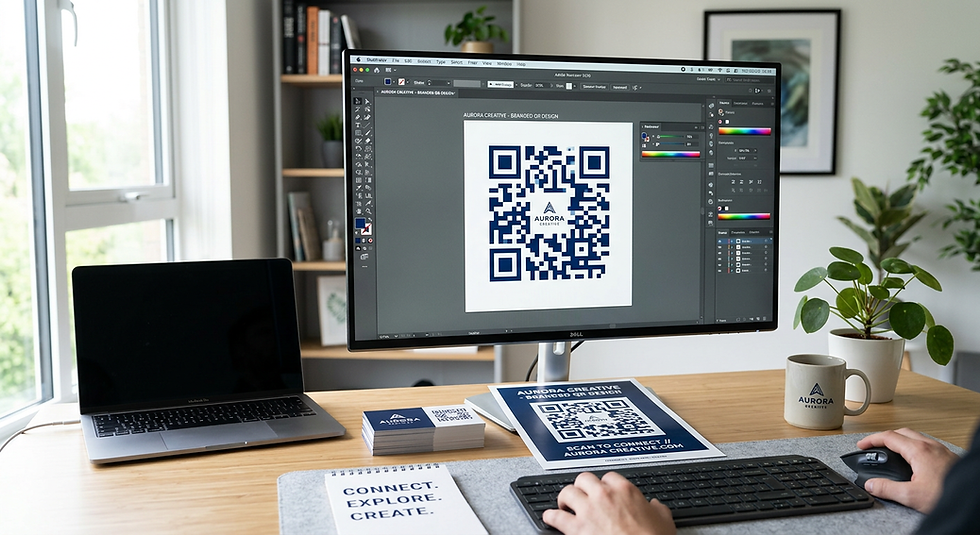
Integrating a canva qr code into your design projects has become an essential skill for modern creators, bridging the gap between static print materials and dynamic digital experiences. Whether you are aiming to drive traffic to a website, facilitate contactless payments, or share event details, leveraging these tools directly within your workflow streamlines the production process significantly.
Quick Summary
A canva qr code is a functional digital tool embedded directly within the design platform that allows users to generate scannable barcodes linking to specific URLs. This functionality simplifies the transition from physical assets like brochures or signage to online platforms, enhancing interactivity and user engagement across various marketing channels.
Generate dynamic or static links for seamless digital navigation.
Customise aesthetics to align with specific brand guidelines.
Directly integrate scan-ready elements into print-ready layouts.
Monitor engagement through redirected traffic and tracking parameters.
Table of Contents
[Understanding the Mechanics of a Canva QR Code](#understanding-the-mechanics-of-a-canva-qr-code)
[How to Create QR Code Assets Within the Editor](#how-to-create-qr-code-assets-within-the-editor)
[Designing the Perfect QR Code Poster](#designing-the-perfect-qr-code-poster)
[Maximising Impact with a QR Code Sticker](#maximising-the-impact-with-a-qr-code-sticker)
[Best Practices for Custom QR Code Implementation](#best-practices-for-custom-qr-code-implementation)
[FAQ](#faq)
[Recommended Reads](#recommended-reads)

Understanding the Mechanics of a Canva QR Code
At its core, a canva qr code functions as a two-dimensional matrix barcode that encodes alphanumeric data, usually in the form of a URL. When a user scans the code using a smartphone camera, the device translates the visual pattern into a command that opens a web browser to a designated destination. In a design environment, this process is automated, removing the need for third-party barcode generators and ensuring that the visual asset remains vector-based and crisp.
The utility of these codes extends beyond simple URL redirection. They serve as a bridge between the physical and digital worlds, allowing marketers to measure the effectiveness of offline campaigns by tracking traffic originating from specific assets. When you use the platform's native tools, you benefit from the ability to keep your branding consistent, as the generation interface is integrated directly into the workspace where your [business cards](https://kode.link/business-cards?lang=en_US) or other professional stationery are crafted.
Understanding how to use this feature effectively is part of learning [what is kode link](https://kode.link/what-is-kode-link?lang=en_US) and how digital connectivity platforms operate. By keeping the design and the functional element unified, you reduce the risk of link errors and layout mismatches that occur when importing external images or generated files into your projects.
How to Create QR Code Assets Within the Editor
To begin the process of how to create qr code graphics, you must first access the 'Apps' or 'Elements' sidebar within your workspace. Search for the QR code generator tool, which prompts you to input the destination URL. Once entered, the system generates the unique pixelated square instantly. This process is entirely non-destructive, meaning you can update the destination URL at any time before finalising your export settings.
Once generated, the code is treated like any other element on your canvas. You can scale it, rotate it, or change its background and foreground colours to better match your brand palette. However, it is vital to maintain sufficient contrast between the dots and the background to ensure scannability. A common mistake is placing a complex, low-contrast pattern behind the code, which renders it unreadable for standard mobile devices.
If you are managing a [business](https://kode.link/business?lang=en_US) account, ensure that the final asset is saved in a high-resolution format such as PDF Print if it is intended for physical distribution. Always test the scan function on multiple devices and under varied lighting conditions before committing to a large-scale print run.
> Pro Tip: Always test your QR code against different screen brightness levels and varying distances to ensure the scan is instantaneous. A code that takes more than two seconds to trigger is likely to cause drop-off in user engagement.
Designing the Perfect QR Code Poster
When designing a qr code poster, the placement and size of the code are just as important as the design itself. The code must be large enough to be scanned from a reasonable distance, typically at least 3-4 centimetres in size for a wall-mounted poster. Avoid placing the code in areas of the design that are crowded with competing visual elements, as this creates visual noise that can confuse the scanning software.
Consider the user journey. If the poster is placed in a high-traffic area, the call to action near the code must be clear and compelling. Phrases such as "Scan to View Menu" or "Scan for Exclusive Discounts" help set expectations for the user. Integrating the code into a hierarchy of information where the scan is the logical next step is the hallmark of a successful marketing layout.
Furthermore, keep the surrounding area of the QR code clear of other design elements, a zone known as the 'quiet zone'. This blank space allows the scanner to isolate the pattern of the code effectively. By maintaining this buffer, you ensure the technical integrity of the code while keeping your poster looking clean and professional.
Maximising the Impact with a QR Code Sticker
Using a qr code sticker provides a versatile way to add digital functionality to merchandise, packaging, or equipment. Because stickers are often smaller and applied to varied surfaces, they require special consideration. The material of the sticker itself should be matte rather than glossy; excessive glare from lighting can bounce off the surface and prevent the mobile camera from reading the contrast patterns accurately.
When creating these for packaging, consider the durability of the final print. If the sticker is meant for outdoor use or long-term handling, verify that the print process supports moisture and UV resistance. For small-scale applications, ensure that the minimum size does not compromise the density of the QR code, as very small codes may lose detail depending on the printer's resolution.
Integrating these codes into your brand identity can also involve subtle branding of the code itself, such as using your brand colours for the foreground. However, strictly follow the technical requirements of the generator to ensure you do not inadvertently render the code unreadable. When implemented correctly, these stickers turn every product into a gateway to your digital ecosystem.
Best Practices for Custom QR Code Implementation
While the platform offers a custom qr code generator, the temptation to over-style must be balanced against functionality. A highly customised code that matches your brand perfectly is useless if the scanner cannot parse the data. Always prioritise the contrast ratio and the integrity of the corners, as these are critical for the scanner to identify the alignment patterns.
Another essential practice is using a URL shortener or a redirect link that allows you to change the destination URL in the future. This is particularly important for physical materials like signage, which cannot be reprinted easily. By using a link that you control, you can update the landing page as your campaigns evolve without needing to replace every physical asset in the field.
Finally, track the source of the traffic. By using UTM parameters in your URL, you can gather analytics on exactly where your scans are originating. This data-driven approach allows you to iterate on your designs, proving the ROI of your print marketing efforts in a way that was previously difficult to quantify.
FAQ
Can I change the destination of a QR code after I have printed it?
Yes, provided you link it to a URL you manage. Using a redirect link or a landing page management tool ensures you can swap the destination URL without affecting the visual code on your printed materials.
What is the minimum size for a scannable QR code?
For most printed materials, a code should be at least 2cm by 2cm. However, for posters or signs, aim for a larger size to ensure ease of use for people walking past.
Why is my QR code not scanning?
Common issues include low contrast between the foreground and background, insufficient 'quiet zone' buffer space, or the code being too small/blurry. Always test with multiple devices before printing.
Can I use my brand colours for the QR code?
Yes, you can customise the colours, but ensure there is high contrast. A dark foreground on a light background is the most reliable configuration for scanning software.
Recommended Reads
[Effective business design strategies](https://kode.link/business?lang=en_US)
[Leveraging custom domains for branding](https://kode.link/custom-domain?lang=en_US)
[Advanced guide to digital interaction tools](https://kode.link/how-to-guide?lang=en_US)
[Enterprise solutions for marketing teams](https://kode.link/enterprise?lang=en_US)



Comments